JavaFX desktop client
The UiNode tree you already describe for the browser also renders as a
native desktop application. Same model, same triggers, same vocabulary —
a different painter.
This is not a web view in a window. UiTable becomes a real JavaFX TableView,
UiField a real TextField, ComboBox or DatePicker. Nothing about the model
was web-shaped to begin with; the browser was simply the first renderer.
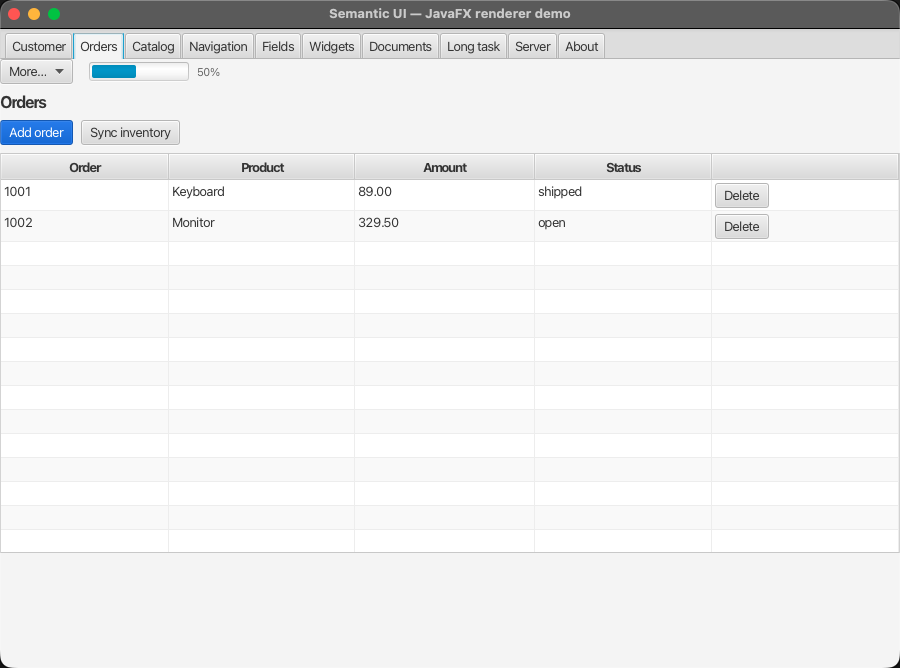
A UiTable with sortable columns, per-row actions, a UiMenuButton and a
UiProgress — all painted from the same tree the browser would get.
<dependency>
  <groupId>ai.mindconnect</groupId>
  <artifactId>mc-semantic-ui-javafx</artifactId>
  <version>0.2.2</version>
</dependency>
A complete small app
Everything below is one file. The tree in ui() is ordinary UiNode data —
hand the very same object to SuiServerRenderer and you get HTML instead.
public class MiniApp extends Application {

    // The overlay is the host ("the DOM"); the renderer paints into it; the bus
    // drives the renderer — the same split as the browser's renderer + event bus.
    private final SuiFxOverlay   overlay  = new SuiFxOverlay();
    private final SuiFxRenderer  renderer = new SuiFxRenderer().attach(overlay);
    private final SuiFxEventBus  bus      = new SuiFxEventBus(renderer);

    /** Plain data. Nothing here is JavaFX-specific. */
    private UiNode ui() {
        return UiStack.of(
                UiText.of("Every field below ends up in one submit."),
                UiForm.of("customer-form", "Customer details")
                        .field(UiField.text("name", "Name", "Ada Lovelace")
                                .asEditable().asRequired())
                        .field(UiField.text("email", "E-mail", "ada@example.com")
                                .asEditable())
                        .action(UiAction.primary("save", "Save").onClick(
                                UiTrigger.invoke("saveCustomer", "customer-form"))));
    }

    @Override
    public void start(Stage stage) {
        // A handler is plain Java. It runs off the FX thread by default, so a
        // slow save never freezes the window.
        bus.registerClientHandler("saveCustomer", ctx ->
                bus.toast(UiToast.success("Saved " + ctx.string("name"))));

        renderer.mount(ui());

        // The overlay loads sui-fx.css itself, and toasts already land on it —
        // no stylesheet wiring, no setOverlay call.
        stage.setTitle("Semantic UI — JavaFX");
        stage.setScene(new Scene(overlay, 520, 360));
        stage.show();
    }
}
Start the app from a main in a class that does not extend Application:
public final class MiniLauncher {
    public static void main(String[] args) { Application.launch(MiniApp.class, args); }
}
A main class that extends Application needs javafx.graphics as a named
module and fails on the classpath with "JavaFX runtime components are
missing". The separate launcher avoids that entirely.
ctx.string("name") reads from the form payload. The bus collects it the way
the browser does: every named field inside the enclosing UiForm, across
arbitrary nesting — and across unselected tabs, because tab panels are painted
eagerly.
Renderer, bus and overlay
The same split as the browser. SuiFxRenderer is the desktop counterpart of
SuiRenderer, SuiFxEventBus of SuiEventBus.
renderer.attach(overlay) | binds the renderer to its host surface |
renderer.mount(UiNode) | paints a tree into the host, returns the Node |
renderer.applyPatch(UiPatch) | applies REPLACE/APPEND/CLEAR/REMOVE to the live scene |
new SuiFxEventBus(renderer) | the bus that drives the renderer |
bus.registerClientHandler(name, handler) | a local Java handler for INVOKE |
bus.toast(UiToast) / bus.showDialog(UiDialog) | feedback and modals |
The renderer owns mounting and patching (as in the browser); the bus owns
triggers, handlers and feedback. bus.applyPatch also exists — it applies the
node ops through the renderer and shows any toasts the patch carries.
Handlers run on a background thread by default; the bus hops back to the FX
thread on its own when it applies the result. Pass FxHandlerThread.FX for the
rare handler that must run on the UI thread.
Busy state is shown at three levels: the clicked control, a global scrim
(delayed 250 ms, so fast handlers never make it flash), and the declarative
UiAction.loading flag.
The server can drive it, too
Because triggers and UiPatch are the same objects the browser uses, an
endpoint that already answers a browser can answer the desktop client without
any change — and without a handler on the client at all:
// No registerClientHandler(...) anywhere: APPLY_RESPONSE does the work.
UiTrigger.api("GET", "/api/inventory")
If that endpoint returns a UiPatch whose operation targets inventory-panel,
the client replaces exactly that panel. The demo does this over a real socket.
What is supported
22 node types render today, with no module beyond the renderer itself:
| Frame | UiAppShell, UiHeader |
| Layout | UiStack, UiSection (tabs), UiScrollPane, UiFieldGroup |
| Data | UiTable (sorting, row actions, pagination), UiTree, UiDetail, UiList |
| Input | UiForm, UiField (text, textarea, number, boolean, date, select, multiselect, file), UiUpload |
| Action | UiAction, UiLink, UiMenu, UiMenuButton |
| Feedback | UiText, UiIcon, UiDialog, UiSpinner, UiProgress, toasts |
Anything else paints a visible placeholder instead of throwing, so an unknown node degrades rather than taking the window down.
UiIFrame needs a WebView, so it lives in a second artifact — see
iframe, in its own artifact below. UiPage is a response envelope
rather than a visual node, and belongs to the event bus — see
Pages and navigation.
Pages and navigation
UiTrigger.go(href) is an APPLY_RESPONSE GET, so navigating on the desktop
means fetching a UiPage and applying it. SuiFxEventBus.applyPage remounts
the tree, drops the previous page's dialogs before opening this page's own, and
sends the toasts to the toast handler.
Relative urls
A server writes its links relatively — /admin/tools, /img/logo.svg,
agents/42 — and a browser resolves them against the address of the page they
arrived on. The desktop needs the same base, or most links on a real screen are
simply unusable.
SuiFxEventBus sets it whenever it applies a page, so an app navigating
through the bus never has to think about it. Renderers reach it through
ctx.resolve(url); set it by hand with renderer.setDocumentBase(url) when
mounting a tree you fetched yourself.
Only a page moves the base, exactly as in a browser: a navigation changes it, an in-place patch does not.
Extension node types
The bus's default mapper calls findAndRegisterModules(), so markdown,
chart, diagram and json-viewer parse as soon as their jars are on the
classpath — without it a page containing one fails to parse at all. A type
nothing on the classpath knows arrives as null and paints as nothing, rather
than taking the whole page down; the SPA degrades the same way.
navigate is the one field with no desktop counterpart — it is a history
push, and a window has no address bar — so instead of being acted on it goes to
a handler that does nothing by default:
bus.setNavigateHandler(href -> breadcrumb.setPath(href));
A page's activeStreams are acted on; see below.
Streaming
STREAM opens its url as Server-Sent Events and feeds each event to the
handler registered for its name. patch is built in — the universal case, an
agent writing patches as it thinks — and an app registers whatever else its
protocol speaks:
bus.onStreamEvent("token", (data, handle) -> transcript.append(data));
bus.onStreamEvent("done",  (data, handle) -> input.setDisable(false));
The dispatch returns as soon as the response headers are in, not when the
stream ends: a button that starts a five-minute run should stop spinning once
the run has started, and the user must stay free to navigate away. The reader
keeps going until the server closes it or FxStreamHandle.abort() is called,
so a stream outlives the tree it started from.
The server's Sui-Stream-Channel header names the channel and its SSE event
ids carry the channel's sequence, which is what makes resume work: when a page
lists activeStreams this bus is not already reading — after a restart, or in
a second window — it reconnects to their resume urls on its own.
bus.activeStreams() lists what it is reading.
The app shell
app-shell and header are part of the renderer — a screen's frame is a base
component, and nothing about it needs installing.
The shell puts the header on top, the menu and the page side by side beneath
it, and the footer at the bottom. The page sits in a slot registered under
UiAppShell.contentId(), so a patch can swap it while the header and menu stay
put — the desktop counterpart of the web shell's data-sui-slot="content". It
scrolls when the page outgrows the window.
iframe, in its own artifact
One node type, one module:
<dependency>
    <groupId>ai.mindconnect</groupId>
    <artifactId>mc-semantic-ui-javafx-iframe</artifactId>
<version>0.2.2</version>
</dependency>
var renderer = SuiFxRenderer.createDefaultRenderer();
SuiFxIFrame.install(renderer);
SuiFxIFrame.style(scene.getRoot());
iframe is a WebView, and javafx-web carries a WebKit build per platform —
tens of megabytes. An app that embeds no pages should not ship a browser engine
in order to draw a table, so this one renderer lives apart and the rest of the
vocabulary costs nothing.
Without the module on the classpath an iframe paints the usual placeholder,
so a tree that contains one still comes up.
sandbox is not a security boundary hereThe attribute is a list of permissions the HTML spec defines for an <iframe>,
and a WebView implements none of that vocabulary. The renderer honours the
one distinction it can actually enforce — a sandbox without allow-scripts
turns JavaScript off — and can do nothing about the rest. Point a UiIFrame at
content you trust.
UiHeader.ExtrasOverflow.MENU is not implemented either: the extras row wraps
rather than collapsing into a dropdown.
The extension types
Two of the four extension node types are painted on the desktop, each in its own artifact so an app pays only for what it shows.
markdown — walked into real controls rather than an embedded browser:
<dependency>
  <groupId>ai.mindconnect</groupId>
  <artifactId>mc-semantic-ui-javafx-markdown</artifactId>
  <version>0.2.2</version>
</dependency>
SuiFxMarkdown.install(renderer);
SuiFxMarkdown.style(scene.getRoot());
Headings, paragraphs, lists, quotes, rules and code blocks; inline bold, italic, code and links. Emphasis accumulates, so bold inside italic arrives as both. A link dispatches through the bus, so a relative one resolves against the page the document came on. Images show their alt text rather than blocking the window on a slow fetch.
The obvious shortcut — render to HTML, hand it to a WebView — would drag a
WebKit build onto every app that shows a paragraph of text, and the result
would sit in the window as a foreign object with its own fonts, its own
selection and its own scrollbars, deaf to the palette around it.
json-viewer — pretty-printed, in a read-only text area:
<dependency>
  <groupId>ai.mindconnect</groupId>
  <artifactId>mc-semantic-ui-javafx-json</artifactId>
  <version>0.2.2</version>
</dependency>
SuiFxJson.install(renderer);
SuiFxJson.style(scene.getRoot());
The web node is backed by a component with IDE-style folding; there is no desktop equivalent and building one would be a tree widget's worth of work for a node whose job is to let someone read a payload. A text area rather than a label, because the reason a payload is on screen is usually that someone wants a value out of it — and it scrolls on its own when the payload is large, which is the case the node exists for. Malformed JSON is shown verbatim: that is exactly what the reader is looking for.
expandLevel and theme are the web component's own knobs and are ignored
rather than approximated.
diagram and chart have no JavaFX painter yet. Their types parse — the bus
registers every extension module on the classpath — so a page carrying one
comes up with that node blank rather than failing.
Icons
Icons come from the same icons.svg sprite the browser loads: the resolver
rebuilds a symbol's shapes as JavaFX geometry, so an icon token means the same
glyph in all three renderers and adding one to the sprite lights it up
everywhere at once. All 2037 Lucide symbols are covered.
The web icon is 1em in currentColor. JavaFX has no such inheritance, so a
glyph attached to a control binds to that control's font and text fill instead
— it tracks the label through hover, disable and theme changes. Every model
type that carries an icon token renders it: UiAction, UiField, UiLink,
UiList, UiMenuButton, UiMenuItem, UiSectionEntry, UiTable,
UiTreeNode, plus the standalone UiIcon.
Point it somewhere else — a different sprite, an icon font, your own drawings —
the same way the browser does, with setIconResolver:
renderer.setIconResolver(token -> myOwnGlyphFor(token));
An unknown token paints nothing rather than failing: a typo costs a glyph, not the window.
UiMenu.State.RAIL collapses the menu here instead of narrowing it to an
icon strip — a rail is a column of icons, and there are none yet. With
toggle, the hamburger button stays behind so the menu can be reopened;
without one, RAIL behaves like HIDDEN.
UiField's CURRENCY, PERCENT, DATETIME and REFERENCE render as a plain
text field rather than a dedicated control, and min/max/step are carried
but not enforced.
UiScrollPane sticks to the newest content the same way, but without the
floating jump-to-latest arrow — scrolling back down is what re-arms it. Its
maxHeight takes pixels; a viewport-relative length like 60vh leaves the
pane uncapped, filling the space its parent column has left.
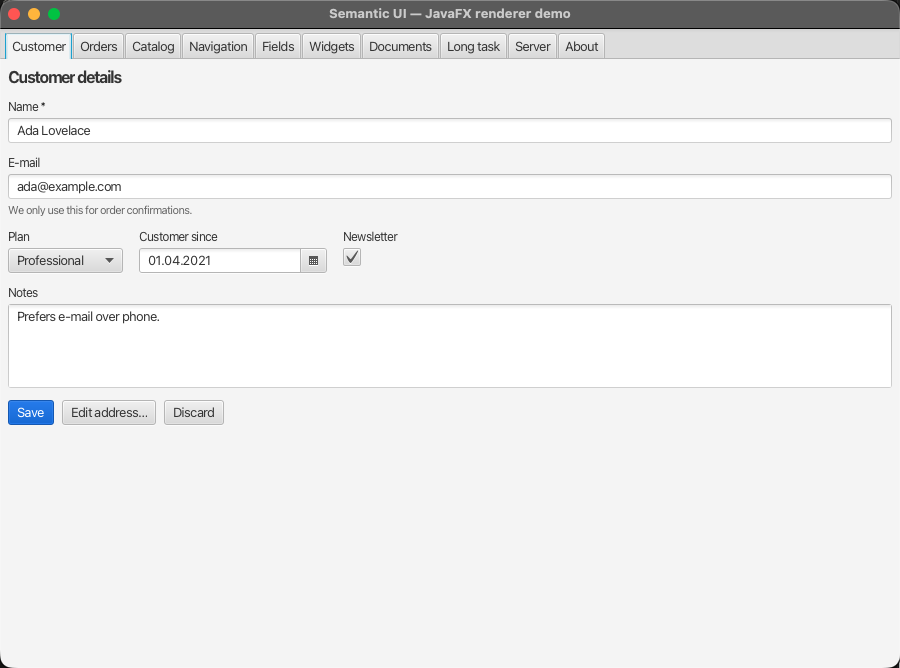
A UiForm: every named control inside it lands in one payload, however deeply
nested.
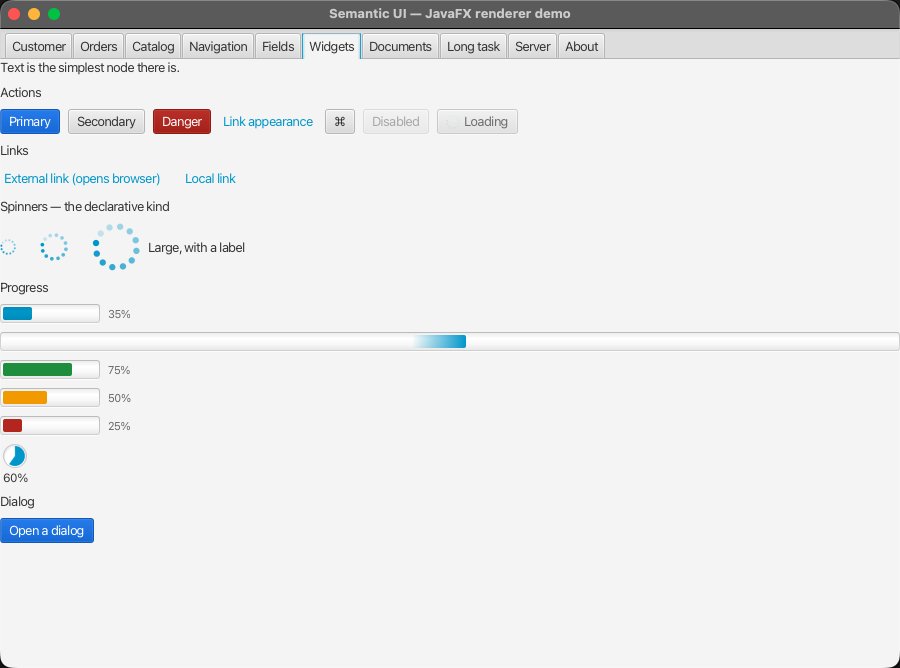
Actions, links, spinners and progress — the declarative kind, driven by the model rather than by code.
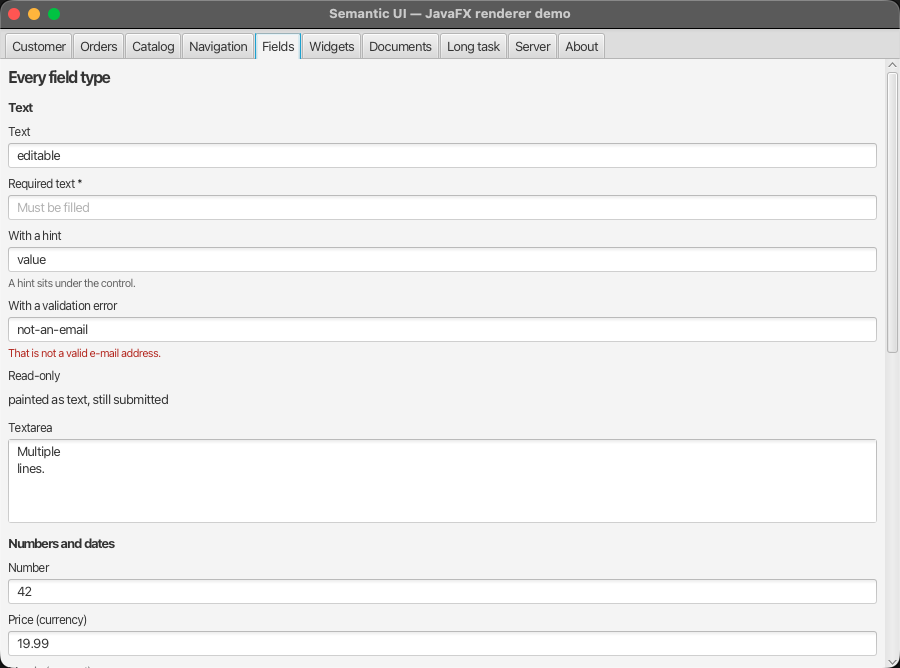
Every UiField type. Tab content sits in its own scroll pane, so a long form
behaves like a web page rather than being clipped.
Six of the seven trigger behaviours work: APPLY_RESPONSE, INVOKE, PATCH,
DOWNLOAD, OPEN_IN_TAB, UPLOAD. STREAM is not implemented — it is
registered as a behaviour that throws, so you get a clear error rather than
silence, and can register your own.
Styling
sui-fx.css is the JavaFX counterpart of sui.css. Every node carries a
sui-<type> style class, so the selectors read like the web ones:
.sui-table { -fx-background-color: -sui-surface; }
.sui-action.is-loading { -fx-opacity: 0.6; }
Run the demo
mvn -pl javafx/mc-semantic-ui-javafx javafx:run
Ten tabs covering every supported node, a long-running handler with live
progress, drag-and-drop upload, and an embedded HTTP server whose endpoints
answer with UiPatch JSON.
See the module README for the current limitations.