Semantic UI
Stop wasting your time with complicated frontend frameworks.
Why did UI frameworks get this complicated? All you wanted was an input screen and a table. Instead you're picking a bundler, learning a reactivity model, reasoning about signals and effects, wiring a router, mirroring your validation rules in a second language — before a single field shows up on screen.
semantic-ui throws that out. You describe the screen as a small, typed tree —
UiTable,UiForm,UiField, … — and a ready-made renderer draws it. Data-driven, with a clean split between logic (yours, where your data already is) and design (one CSS system, shared by every screen). No components. No state. No build step.
semantic-ui flips the relationship:
| React / Angular | semantic-ui | |
|---|---|---|
| You write | components (JSX / templates) | data — a typed UiNode tree |
| Markup + logic | mixed inside components | split: model = structure, CSS = look |
| State | hooks / signals / Redux | none — UI = render(your data) |
| Styling | per component, drifts over time | one shared CSS design system |
| Runtime / build | a framework + toolchain to learn | a <script>, or plain JSON |
| Interactivity | wire up handlers + state yourself | declarative triggers (fetch / patch / navigate) |
The model is plain typed JSON. A small TypeScript renderer turns the tree into a live, interactive UI in the browser; on the JVM a matching Handlebars renderer produces the same markup as no-JS server HTML, and a JavaFX renderer draws the very same tree as a native desktop client. One model, many renderers: a live app, no-JS HTML, a desktop client, and a built-in visual editor. Where the data comes from is up to you — a JavaScript object in the page, or any backend that emits the JSON.

The rightmost box is not hypothetical. Below is one UiNode tree, drawn
twice: on the left by the JavaFX renderer as a native desktop
window, on the right by the browser renderer — live, right here on this page.
The tree on the right was serialised straight out of the running Java demo, so
it really is the same model and not a lookalike.
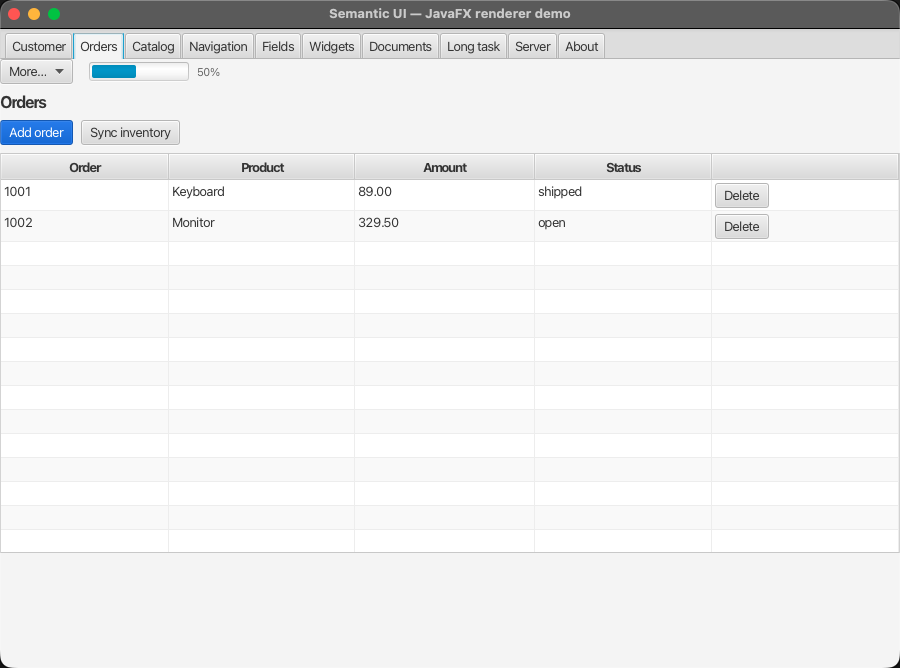
JavaFX — a real TableView, Button, ProgressBar.
Browser — real DOM, and interactive: add or delete orders and the fulfilment bar moves with them.
The two shapes you'll write
Everything is one of two payloads. Build them with the Java API, or emit the same JSON from anything — they are the identical wire format.
UiPage — a whole screen. What you return when the user navigates:
- Java
- JSON
// The table in both screenshots above — this is the whole source.
UiPage.of("/orders",
    UiTable.of("orders-table", "Orders")
        .column(UiColumn.text("id", "Order").asSortable())
        .column(UiColumn.text("product", "Product"))
        .column(UiColumn.number("amount", "Amount"))
        .column(UiColumn.text("status", "Status"))
        .action(UiAction.primary("add-order", "Add order")
                .onClick(UiTrigger.invoke("addOrder")))
        .rowAction(UiAction.danger("delete-order", "Delete")
                .onClick(UiTrigger.invoke("deleteOrder")))
        .row(Map.of("id", "1001", "product", "Keyboard",
                    "amount", "89.00", "status", "shipped")));
{
  "type": "page",
  "navigate": "/orders",
  "node": {
    "type": "table", "id": "orders-table", "title": "Orders",
    "columns": [
      { "type": "column", "id": "c-id",      "label": "Order",   "dataKey": "id", "sortable": true },
      { "type": "column", "id": "c-product", "label": "Product", "dataKey": "product" },
      { "type": "column", "id": "c-amount",  "label": "Amount",  "dataKey": "amount" },
      { "type": "column", "id": "c-status",  "label": "Status",  "dataKey": "status" }
    ],
    "rows": [
      { "type": "row", "id": "1001",
        "data": { "id": "1001", "product": "Keyboard", "amount": "89.00", "status": "shipped" } }
    ],
    "actions": [
      { "type": "action", "id": "add-order", "label": "Add order", "style": "PRIMARY",
        "onClick": { "behavior": "INVOKE", "handler": "addOrder" } }
    ],
    "rowActions": [
      { "type": "action", "id": "delete-order", "label": "Delete", "style": "DANGER",
        "onClick": { "behavior": "INVOKE", "handler": "deleteOrder" } }
    ]
  }
}
That is the entire source of the table you saw twice at the top of this page — once as a JavaFX window, once live in the browser. No build step, no components, nothing else on the page.
UiPatch — a surgical update. What you return to change part of the
screen without resending it. Each operation targets a node by id
(REPLACE, APPEND, CLEAR, REMOVE), and it can carry a toast:
- Java
- JSON
UiPatch.of()
    .patch(UiPatch.Operation.replace("cart-total",
            UiText.of("cart-total", "€ 49.00")))
    .toast(UiToast.success("Added to cart"));
{
  "patches": [
    { "op": "REPLACE", "targetId": "cart-total",
      "node": { "type": "text", "id": "cart-total", "text": "€ 49.00" } }
  ],
  "toasts": [ { "level": "SUCCESS", "message": "Added to cart" } ]
}
That's the whole interaction model: a node carries a
trigger, the trigger calls you, you answer with a UiPage or
a UiPatch. Nothing else to learn.
Draw it instead — and download the running app
You don't have to write that JSON by hand. The visual editor runs entirely in your browser — no install, no account, no backend — and it edits the same tree this page has been describing: drag nodes, set properties, watch the live preview.
Then export it as a runnable application. Pick your target and download a zip:
| Export | What you get |
|---|---|
| Static HTML | An index.html plus the runtime. Open it, or drop it on any static host. |
| Spring Boot | A Maven project with a controller per page. mvn spring-boot:run. |
| Node.js | An Express app with a route per page. npm install && npm start. |
The export is a plain, hand-written semantic-ui app — not a copy of the editor and not a runtime that interprets a saved file. It is the starting point you would otherwise have typed yourself, which also makes the editor a reasonable way to learn the model: build a screen, export it, read the code.
Choose your path
semantic-ui fits four setups. Pick the one that matches your stack and start there — all four share the same core concepts.
- Java / Spring Boot — a controller returns a
UiPage; get no-JS server HTML (SSR) and/or a live SPA client from the same code. - JavaScript client only — no backend at all: load
the runtime from a
<script>and renderUiNodeliterals in the browser. - Node.js backend — an Express (or any) server emits
the
UiPageJSON; the browser renderer paints it. - JavaFX desktop client — no browser at all: the same tree painted as a native desktop window, with local Java handlers.
Open the interactive widget showcase ↗ — a fully static page (no backend) that renders every UiNode, each shown next to the JSON the renderer consumes and the equivalent Java builder.
Why it feels different
Frontend development has piled up a mental load that's wildly out of proportion for most CRUD-shaped business apps: build toolchain, reactivity model, state management, routing, form-state, server-state cache, a component library, validation — much of it duplicated on both sides of the wire.
semantic-ui takes a different stance:
- You write data, not components — no JSX, no lifecycle, no re-render model.
A
UiTableliteral is the table. - No state management — the UI is a pure function of your data.
- Structure is data, design is CSS — they can't tangle; you get a consistent design system by default. Business logic stays where your data is.
What you can build with it
Most application UIs are structured screens — and structured screens are exactly what a typed tree describes well:
- Admin / backoffice, ERP / CRM, accounting, HR, order entry
- Workflow, wizard and case-management UIs
- B2B SaaS dashboards, tables, reporting surfaces
- Customer-facing CRUD and shop frontends — the design system is yours to restyle; see the shop demo
- Editors and canvases — the visual editor and the diagram extension are themselves built this way
- Streaming / chat surfaces, via
UiPatchover SSE - LLM-agent-operable UIs — a finite vocabulary is far easier for an agent to drive than free-form HTML
If a screen can be described as "these fields, this table, these actions", it fits. And when one corner of a page needs something bespoke, you don't leave the framework: add a node type (or drop in a UI island) and keep the rest.
Core concepts (shared by all three paths)
- How it works — the data → renderer model, with a full example.
- Node vocabulary — all 27 types, each with its own reference page: fields, Java, JSON and a live preview.
- Triggers & actions — how clicks/forms turn into fetch / patch / navigate.
- Forms & validation and Mobile & responsive — the two topics that cut across many node types.
- Rendering modes — SSR, SPA, and partial updates
with
UiPatch. - JavaFX desktop client — the same tree as a native desktop app, with a complete small example.
- How it compares — versus HTMX, Datastar, Inertia.js and Vaadin Flow.
Setup lives in the quickstart for your stack — pick one under Choose your path above.